
MRI Prism
Language
Interactive MRI learning platform

MRI Physics —
made visible.

01 · Learn MRI

Modules built around mechanisms, not textbook order.

Each interactive module connects several layers of MRI physics in one visual mechanism — from microscopic spin behaviour to the final image.

One module. Several layers of MRI physics.

A single interactive scene brings together effects that are usually separated across different textbook chapters.

Spin & B₀

Alignment, population and precession set the physical starting state.

RF pulse

Excitation tilts magnetisation and creates the transverse signal.

Timing · TE / TR

Sequence timing links the mechanism to contrast and signal level.

Image & SNR

Reconstruction, noise and contrast define what the user finally sees.

Gradients & k-space

Encoding converts spatial position into sampled data and readout order.

Relaxation

T₁ recovery and T₂/T₂* decay reshape the signal over time.
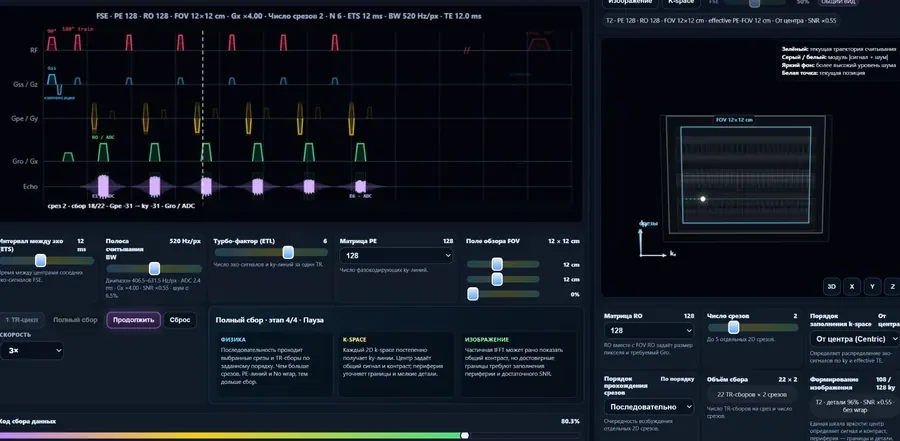
Interactive module

Inside one module, microphysics, vectors, timing, spatial encoding and image formation are shown as one connected system.

Topic map

Browse the same knowledge as a map: foundations, signal, encoding and image quality.

Spin B₀ Precession Larmor frequency Net magnetisation Equilibrium Vector model RF excitation Flip angle FID T₁ / T₂ / T₂* Dephasing Refocusing Spin echo Echo time Repetition time Gradients Slice selection Frequency encoding Phase encoding K-space Readout FOV Matrix Voxel SNR Bandwidth Resolution Contrast Noise Artifacts Aliasing Distortion Motion Partial volume
02 · AI Tutor

A personal MRI helper, always close.

When formulas feel heavy or spatial theory becomes hard to hold in your head, the tutor explains the principle in plain language and connects it back to the visual module.

Always at hand

Ask, clarify, understand.

Use it to check a term, unpack a formula, compare mechanisms or simply ask how a part of MRI works.

  • Plain-language explanations of difficult formulas
  • Clarification of MRI principles and scanner logic
  • Guidance back to the right visual module
Back to the three paths
03 · DICOM Viewer

Practice belongs beside theory.

The viewer is a distinct product route: focused on local work with imaging data, not on uploading clinical studies merely to open a file.

  • Local-first workflow
  • Clear separation between learning and clinical data
  • Release notes, support and license area later
Back to the three paths
A product, not a download button

One account. Separate responsibilities.

Learning progress and tutor preferences can live in an account, while the viewer itself remains designed around local handling of imaging data.

Why MRI Prism

The visual metaphor has one job: make choices obvious.

The white beam is complex MRI knowledge. The prism separates it into three concrete ways to learn, ask and apply.

One visual language

Routes, module states and theory panels use the same hierarchy rather than independent page designs.

Meaningful motion

Animation clarifies flow and relationships. It does not compete with the content that the learner came to understand.

Honest scope

Educational simulations are not presented as scanner controls, and practical tools are not presented as clinical decisions.